

The New eSignature Experience:
Key Takeaways
- eSignature is the most-used tool NAR measured in its 2025 REALTORS® Technology Survey, at 79% adoption, with social media at 75%, and drone photography and video at 52%.
- At 79% adoption, eSignature is infrastructure rather than an advantage. The decision that still matters is where the signed document ends up after signing.
- When the e-sign has no connection to your transaction system, every completed packet becomes a manual filing job for someone in the back office.
- Back At You eSign is included with Back At You Office at no extra cost, and for brokerages running Back At You Financial a packet can be linked to a transaction and matched to a checklist item before it’s ever sent.
The packet comes back signed at 9:40 on a Tuesday. Then someone downloads the PDF, renames it to match your file convention, uploads it to the transaction, finds the right checklist item, and marks it complete. Call it a few minutes when nothing goes wrong, repeated on every document in every file your office touches this month.
The signature was never the slow part. The handoff after it is, and that handoff exists for one reason: the tool that captured the signature doesn’t know what a transaction is. If you’re evaluating real estate eSignature software right now, that’s the thing worth evaluating. The signing itself has been a solved problem for years.
What is real estate eSignature software?
Real estate eSignature software lets agents and clients sign contracts, disclosures, and addenda electronically instead of on paper. Standalone signing tools capture the signature and hand back a finished PDF. Embedded eSignature runs inside the CRM or transaction system, so the signed document files itself against the transaction record.
Both capture a valid electronic signature. They produce very different amounts of work afterward, and that difference lands almost entirely on the people who manage the files.
Why eSignature adoption is no longer the question
eSignature is the most-used technology among the tools NAR measured. NAR’s 2025 REALTORS® Technology Survey found 79% of members use it.
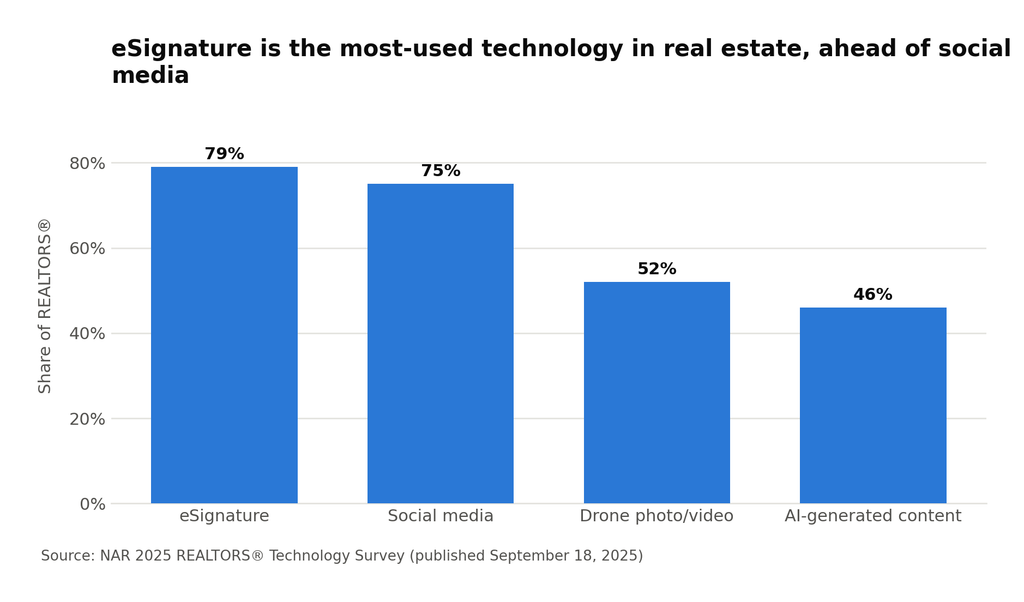
A tool at 79% adoption is plumbing. Most of your agents already sign electronically, and clients expect it. In the same survey, 82% of REALTORS® said their clients responded positively or very positively to technology in the transaction, so the education phase is largely over on the client side too.
What an unconnected signing tool leaves for your back office to do
When the signing tool has no connection to your transaction system, every completed packet becomes a manual filing job. The signing tool finishes its work when the last signer clicks. Your work starts there.
You know the drill. Download the executed PDF. Rename it, because the signing tool named it whatever the agent typed at 11pm. Upload it to the transaction. Open the compliance checklist, find the item it satisfies, mark it off. None of it is hard, all of it is repetitive, and none of it can be skipped. That’s exactly the profile of work that quietly eats a coordinator’s week.
Then there are the cases that don’t follow the sequence, and that’s where the real time goes:
- The packet nobody opened. It’s day four, the file closes Friday, and checking where it stands means opening a second system whose status page nobody else on your team can see.
- The packet linked to nothing. It went out as a one-off, it’s signed, and now it lives in a downloads folder on somebody’s laptop instead of in the file.
- The document you already have. It’s on the transaction, but the signing tool can’t see the transaction, so someone re-uploads a file the system is already holding.
Plenty of standalone signing tools integrate with transaction management systems, and reminder cadences and delegated sending are standard almost everywhere. If your signing tool already writes back to your transaction system, you have most of this already. The comparison is against an unconnected setup.
| Step in the workflow | Unconnected signing tool | eSign that starts from the transaction |
|---|---|---|
| Starting a packet | Open a second system | Start in the same system that holds the transaction and the contacts |
| Adding documents | Download from the transaction, re-upload to the signing tool | Select files already on the transaction, filtered by buyer or seller side |
| Matching to compliance | Manual, after the packet returns | Matched to the checklist item during setup, before it sends |
| Filing the executed document | Download, rename, re-upload, tick the checklist | Already attached, because the packet knew the transaction going out |
| Finding it months later | Search two systems | One record, with the packet history and completion certificate on it |
Notice what the right-hand column isn’t claiming. It isn’t faster to sign. The signing experience is roughly the same everywhere, and it should be. What changes is how many times a person has to touch the document before and after.
How Back At You handles eSign
We rebuilt eSign inside Back At You Office because the filing work was the part worth removing, and you can only remove it from a tool that already knows the contacts, the transaction, and the checklist. It’s included with Back At You Office at no extra cost, so it isn’t one more per-seat line item on top of the platform your brokerage already runs on.
For transactions to be connected to e-Sign, you will need Back At You Financial alongside Back At You Office, because that’s where transactions and compliance checklists live. On Back At You Office alone you get the packet workflow and the dashboard. Many brokerages use e-sign not only for transaction, but also for their daily admin tasks such as agent forms, tax documents, sign rider orders, business card orders, and other non-transaction documents that need to be easily organized and signed.
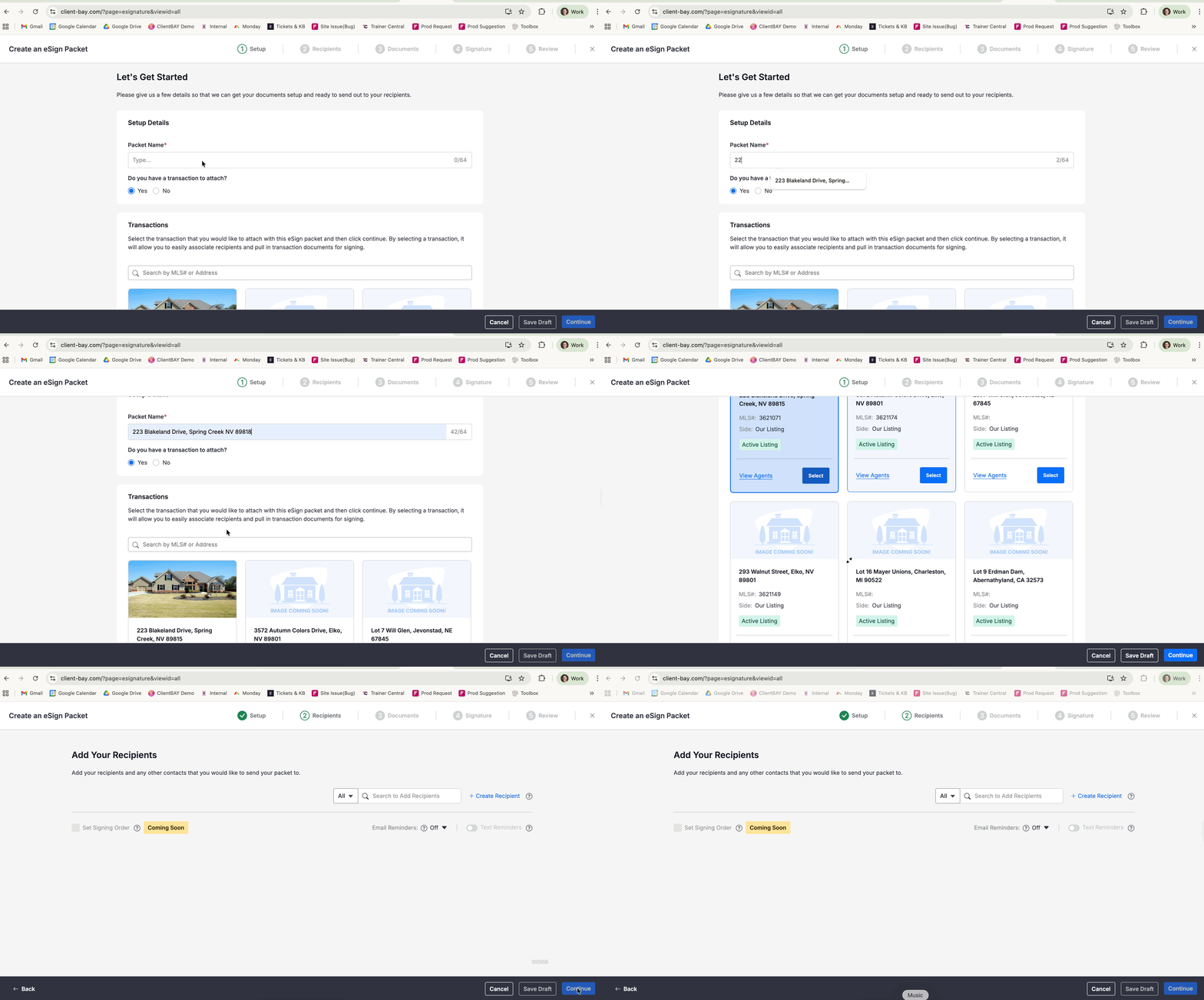
The new eSign experience is a five-step wizard: set up the packet, add recipients, upload and arrange documents, add signature tags, then review and send. A green check mark appears next to each step as you finish it. Several pieces are aimed at the back office:
One place to answer “where is it.” The eSign Dashboard shows real statuses: Sent, Opened, Completed, Declined, Expired, Void. From the three-dot menu you can resend, view history, or download a completion certificate.
Filing that happens on the way out. The packet links to a transaction at step one. Attaching one is optional, so one-off documents still work, but when you attach it the document is already where it belongs when it comes back.
Compliance that assembles itself. A Checklist Item column appears during the Documents step when the transaction has an active checklist. You match each file to the requirement it satisfies while building the packet.
Sending for an agent who’s out. Admin and staff users create a packet on behalf of another user through a dropdown in step one. No shared passwords. No logging in as somebody else.
Documents you already have, already there. Pull them in through Choose From Files, filtered by buyer or seller side.
Follow-up that runs itself. Recipients get explicit roles, Signer, Receives a Copy, or Notification Only, up to ten total per packet with at least one Signer. Reminders run from every 12 hours to every 5 days, defaulting to every 2.
Here is an example of how to set up a Packet:
Frequently asked questions
What’s the difference between standalone eSignature and eSignature built into a CRM?
Both capture a valid electronic signature. A standalone tool returns a finished PDF that someone then files against the transaction, either manually or through an integration if it has one. eSignature built into a CRM starts from the transaction record, so the signed document, its status, and its history stay with the file without anyone moving them. Plus the ease of use and history of use is completely intuitive.
Can a broker or admin send a signature packet on behalf of an agent?
In Back At You Office, yes. A user with Admin or Staff permissions selects the agent from a dropdown in the first step of the packet wizard and sends in their name. This matters most for transaction coordinators covering agents who are out. Several standalone signing platforms offer delegated sending too, so it’s worth checking what you already have before switching for this alone.
How do you send a document for signature from a real estate CRM?
In Back At You Office you click Create Packet and move through five steps: name the packet and optionally attach a transaction, add recipients and set their roles, upload or select documents, place the signature tags, then review and send.
Can you change a packet after it’s been sent?
Not in place. Once a packet leaves Draft, the document text and signature fields can’t be altered. While it’s still out for signature you can void it and edit, and your placed tags carry over to the updated document. Once every signer has finished, the packet is final, and the way to make changes is to duplicate it and send a new one.
What happens to old eSign documents when a brokerage moves to a new system?
In Back At You Office, the old and new eSign systems run side by side during the upgrade. Packets you already created stay editable only in the system that created them. Once the transition finishes, completed, expired, declined, and void legacy packets move automatically into the new eSign area, marked read-only with a gray Legacy badge, and stay accessible indefinitely.
See it on your own files
If your coordinators are still downloading, renaming, and re-uploading signed documents, that’s not an eSignature problem. It’s a placement problem, and it’s fixable. Book a thirty-minute session with a product specialist and we’ll walk the packet-to-checklist workflow using your transactions, not a slide deck. See the platform in action.